Showing posts with label theme. Show all posts
Showing posts with label theme. Show all posts
Wednesday, February 22, 2017
Choco Theme Launcher
Choco Theme Launcher
yeay this is for SS ChocoTheme Final Edition:

link: ChocoThemeArtFinal.rar
note: in my latest update I just added a little modification that adds the name of the operator in tracking, maybe if there was more inspiration I will update this theme sorry I cant add SS for this hehehe
how to instal:
1. make sure have a backup before apply this theme
2. ekstract first
3. then you can instal with apk replace or push with root explorer
4. if you fail, you just look in the mirror hehehe (kidding)
================================================== ==================================
this is for who hate bottom toogle bar
ss:
link: Download
note: rename to systemui.apk and replace with apk replacer / root explorer
================================================== =================================================
all features working well, i just remove statusbar greper. i think a few people dont like statusbar greper hehehe

link: Download
hit with apkreplacer
================================================== ================================================
[non greper] added data traffic (you can show/hide data traffic with statusbar greper.apk), moved carrier operator from tracking to left side statusbar, added carrier name to tracking.

link: Download
================================================== ===============================================

link: Download
-ekstrak
-hit with apk replacer
chocotheme build #3
SS:
link: Download
hit with apk replacer
link: ChocoThemeArtFinal.rar
note: in my latest update I just added a little modification that adds the name of the operator in tracking, maybe if there was more inspiration I will update this theme
sorry I cant add SS for this hehehehow to instal:
1. make sure have a backup before apply this theme
2. ekstract first
3. then you can instal with apk replace or push with root explorer
4. if you fail, you just look in the mirror hehehe (kidding)
================================================== ==================================
this is for who hate bottom toogle bar
ss:
link: Download
note: rename to systemui.apk and replace with apk replacer / root explorer
================================================== =================================================
all features working well, i just remove statusbar greper. i think a few people dont like statusbar greper hehehe
link: Download
hit with apkreplacer
================================================== ================================================
[non greper] added data traffic (you can show/hide data traffic with statusbar greper.apk), moved carrier operator from tracking to left side statusbar, added carrier name to tracking.
link: Download
================================================== ===============================================
THIS IS FOR WINTERMOD BUILD 2
link: Download
-ekstrak
-hit with apk replacer
chocotheme build #3
SS:
link: Download
hit with apk replacer
Available link for download

Monday, January 16, 2017
Cara Mengubah Theme atau Background Microsoft Office 2013
Cara Mengubah Theme atau Background Microsoft Office 2013
Tahukah anda, Microsoft Windows dan Office produk yang tersedia dengan fitur tampilan menyesuaikan yang memungkinkan kita untuk mengubah latar belakang, warna dan tema untuk membuat mereka lebih menarik. Sebelumnya versi Microsoft Office 2007 dan 2010 memiliki tiga tema warna - Hitam, Silver dan Biru. Namun dalam versi ini, kita tidak mendapatkan pilihan untuk memilih semua jenis skema warna meskipun aku menemukan opsi baru, Latar Belakang Kantor yang berisi total 6 background untuk Office 2013. Ketika saya melayang kursor mouse di atas masing-masing latar belakang satu per satu saya bisa melihat pratinjau instan latar belakang Kantor masing-masing.
Untuk mengubah Microsoft Office 2013 Latar belakang, Anda harus mengikuti langkah-langkah yang disebutkan di bawah ini:
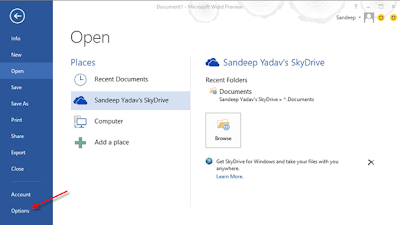
1. Anda dapat mengubah Office 2013 Latar belakang dari Pilihan. Dalam contoh di bawah ini, saya telah menggunakan Microsoft Office Word 2013 untuk mengubah latar belakang. Pertama-tama, memulai setiap produk Microsoft Office seperti Word, Excel, dll Sekarang periksa panel kiri layar awal dan klik Options. Panel Pilihan adalah area pengaturan Microsoft Office 2013 dan satu-satunya tempat di mana Anda dapat mengubah latar belakang dan melakukan konfigurasi lainnya.
2. Melanjutkan dari langkah sebelumnya, di panel Pilihan pastikan bahwa Anda berada di General Tab. Sekarang mencari opsi Latar Belakang Kantor yang tersedia di bawah Personalisasi salinan judul Microsoft Office. Pilih latar belakang yang Anda sukai dan klik OK.
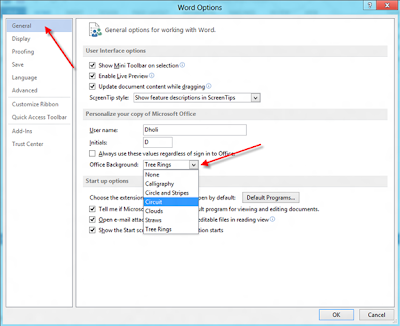
Ada enam latar belakang di semua tersedia dalam Latar Belakang Kantor dan latar belakang ini adalah Kaligrafi, Circle dan strip, Circuit, Awan, Sedotan dan Rings Pohon.
Available link for download
Subscribe to:
Posts (Atom)